


EvGateway
4.1114.00 Reviews
App Specs
- Version
- 5.9.9
- Updated On
- License
- Free
- Downloads
- 10,000+
- Developer
- EvGateway
- Categories
- Auto & Vehicles
- Platform
- Android
Screenshots
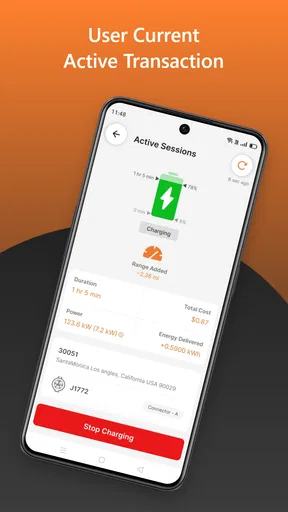
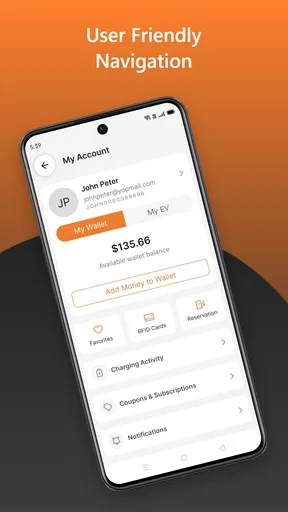
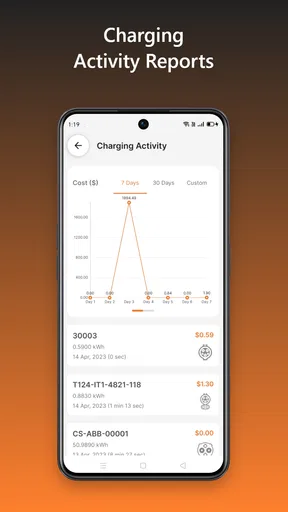
 Analysis by AppCompare
For an electric vehicle driver, the difficult part of charging is often not plugging in. It is knowing where to go, what the stop will involve, and whether a charging trip will fit naturally into the rest of the day. EvGateway approaches that problem as a dedicated charging companion rather than a general travel app. I found its value easiest to understand when I treated it as a tool for reducing uncertainty around public charging.
That focus makes EvGateway particularly relevant to people who already drive an EV and want a straightforward way to organize charging stops. It is a free app in the Auto & Vehicles category, developed by EvGateway, with an Everyone age rating. Its average rating is 4.1 from around 572 ratings, and it has passed 10K installs, so it has a modest but established presence among EV drivers.
Why the charging-focused approach matters
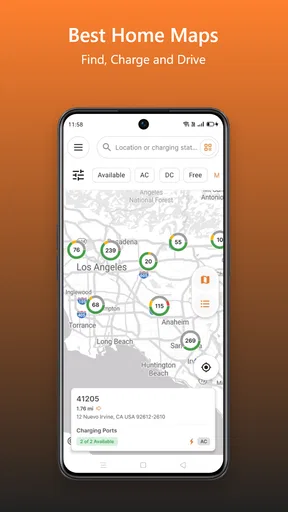
The app’s central capability is simple: it is built for EV drivers who need charging information while they are away from home. That sounds narrower than a full navigation platform, but the narrower purpose can be useful. A general map may show businesses, roads, and points of interest first, while a charging app puts the charging stop at the center of the task.
In my experience, that changes how I prepare for a journey. Instead of searching broadly and then filtering through unrelated results, I can begin with the question that actually matters: where can I charge when I need to? This is most helpful before leaving, when I want to identify a practical stop, and during a trip, when I need to make a quick decision without turning the search into a larger planning exercise.
The important distinction is that the app is not merely a directory in the background. Its usefulness comes from making charging a deliberate part of the drive. That encourages better habits: checking a possible stop before the battery becomes uncomfortable, considering whether a location fits the route, and avoiding a last-minute search when options may be less convenient.
I would not describe it as a replacement for every navigation tool on a phone. A regular maps app may remain better for complete turn-by-turn travel planning, traffic context, restaurants, hotels, and other parts of a journey. EvGateway makes more sense alongside those tools, especially when the charging question is the part of the trip that needs the most attention.
Using it before a journey
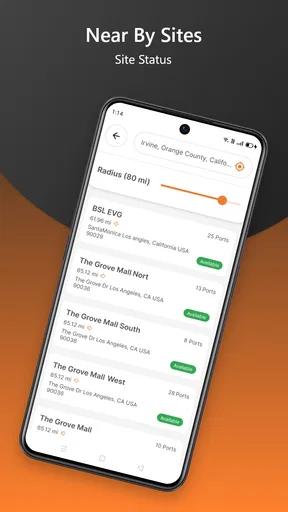
A useful workflow is to open the app before starting a longer drive and think through the trip in stages. First, I would identify the area where charging is likely to become relevant. Then I would inspect the available charging choices and decide which one is realistic for the route, rather than waiting until the battery level creates pressure.
Worth Reading Before You Choose

EA SPORTS FC Mobile 26 Is a Bigger Football Game, but It Takes Time

Flipboard Shows What News Apps Must Do Beyond the Feed

Switching to Android Auto Means Rethinking Your Driving Routine

Google Calendar Makes a Crowded Week Easier to Manage

Ludo King Makes the Most of the Minutes Between Plans

Baby Panda World Brings Quick Play to Modern Phones, but Its Game Library Feels Busy
This approach has a small but meaningful advantage: it separates planning from urgency. When I am still at home or parked safely, I have time to compare locations and consider whether a stop is near the road I am already taking. If I wait until the warning range feels uncomfortable, I am more likely to choose the first visible option instead of the most sensible one.
For new EV owners, this can also make public charging feel less intimidating. The app gives the charging task its own place, which is easier than trying to remember several unrelated searches. I would still check the vehicle’s own information and any details shown at the station, but EvGateway can serve as the starting point for the decision.
There is another practical benefit for drivers who share a vehicle. One person can use the app to identify a charging stop before a trip and communicate the plan to someone else without needing to explain an entire navigation route. That keeps the conversation focused on the part of the journey that could otherwise cause the most uncertainty.
What the experience is like during a real errand
Imagine leaving work with enough charge for the evening commute but not enough confidence for an additional appointment across town. I would open EvGateway before driving, look for a suitable charging possibility near the destination or along the way, and decide whether a stop fits the schedule. The useful outcome is not simply finding a marker; it is making the charging decision before I am already late or distracted.
That scenario shows where a focused app can beat improvised searching. A general search may return a station, but the driver still has to turn that result into a plan. With a charging-specific tool, the search begins with the right subject. I can then use my normal navigation app for the road directions if that is more comfortable, while keeping the charging search separate and easier to revisit.
I also see value in short local trips. People often think charging apps are mainly for road travel, but a local driver may need one when visiting a new shopping area, workplace, public building, or unfamiliar neighborhood. The app can help answer a practical question before arrival: is charging likely to be part of this stop, or should I plan around another option?
For a long journey, I would use it as a checkpoint tool rather than blindly trusting one planned stop. Conditions change, and a driver may alter the route, spend longer at a destination, or discover that the original plan no longer fits. Checking the charging situation again at sensible moments is more reliable than treating the first search as permanent.
Small habits that make it more useful
The first habit I recommend is checking earlier than feels necessary. Waiting until the battery is very low reduces flexibility, particularly if the preferred location is busy, inconvenient, or no longer suitable for the route. Searching while there is still room to adjust gives the app a planning role instead of turning it into an emergency button.
The second is to judge a charging location by the whole stop, not only by its existence. A station may be technically available but awkward for the route, far from the destination, or poorly matched to the time available. EvGateway helps with the discovery part, but I still make the final decision using my vehicle, schedule, and surroundings.
The third is to keep a backup in mind on unfamiliar journeys. I would not rely on one search result as the only possible answer when traveling far from home. A second option gives me room to react if the first stop does not suit the route or the timing. This is a sensible trade-off with any charging finder, and it is especially important when a driver has little experience with public charging.
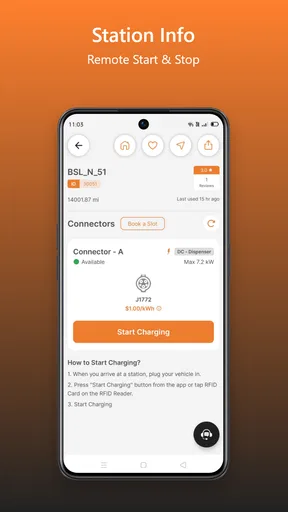
A fourth useful habit is to separate finding a station from understanding the charging session itself. The app can help me locate a charging possibility, but I should still be prepared to follow the instructions at the location and use whatever process the station requires. That distinction prevents a common mistake: assuming that discovering a charger automatically explains every step needed to start charging.
Where the app fits beside usual alternatives
The usual alternative is a general navigation or maps app. That option is convenient because it already handles roads and destinations, and many drivers prefer keeping everything in one place. If my main need is complete route guidance with a quick glance at nearby charging, a general maps tool may be enough.
EvGateway becomes more appealing when charging is the primary task. Its dedicated purpose makes it easier to begin with the energy stop rather than treating it as one detail among many map results. I would choose it when I am planning around charging first, then hand the route to another tool if I want richer navigation features.
Another alternative is relying on the vehicle’s built-in system. That can be excellent for drivers who want charging integrated directly with battery information and route planning. The built-in system may feel more natural while driving because it already knows the car’s context. EvGateway is more useful as an independent planning layer, particularly before the trip or when I want to examine charging options without committing the whole journey to the car interface.
Some drivers may also prefer a charging-network-specific app. That can be the better choice when the driver already knows which network they intend to use and needs account, payment, or session management within that network. EvGateway is better suited to the discovery stage: deciding where charging might fit. I would not expect a general charging finder to replace a network’s own app when the actual session depends on that service.
The trade-offs I noticed
The focused design is also the app’s main limitation. It does not remove the need for judgment. Finding a charging location is only one part of a successful stop, and I still need to think about route, battery level, timing, vehicle compatibility, and the instructions at the location. Anyone expecting one app to manage every part of EV travel may find the experience incomplete.
There is also a mental switch between tools. If I use EvGateway to find a charging stop and another app to navigate there, I have to move information from one place to another. That is not a serious problem for a planned journey, but it can feel less convenient than an all-in-one system. Drivers who value minimal interaction may prefer their vehicle’s integrated planning or a familiar maps app.
Public charging information can also be difficult to interpret in real life. A location may appear suitable, yet the driver may encounter practical complications such as a poor position for the route or a process that takes more time than expected. I treat the app as a decision aid, not a guarantee that every stop will be effortless. That mindset is important for avoiding overconfidence.
The interface is easiest to appreciate when I have a clear question. If I open it without knowing whether I am planning a local stop, a longer route, or a backup option, the experience can feel less purposeful. The app rewards a direct workflow: search for charging, assess the result, and decide what to do next. It is less compelling as a general-purpose travel companion.
Its free price is a strong advantage for trying that workflow without adding another purchase to the cost of EV ownership. At the same time, free access should not be confused with a complete replacement for every service involved in charging. I would still keep the relevant vehicle and network tools available when a journey depends on them.
Who will get the most from EvGateway?
I think the best match is an EV driver who wants a dedicated place to think about charging. That includes people new to electric driving, drivers who regularly visit unfamiliar areas, and anyone who feels more comfortable having a charging option identified before setting off. The app’s straightforward purpose can reduce the friction of turning an uncertain stop into a planned one.
It is also a good fit for drivers who already have a preferred navigation app but do not want to depend on its charging search alone. In that setup, EvGateway handles the charging question while the other app handles the road. This two-tool arrangement is not as seamless as a fully integrated system, but it can be clearer because each app has a defined job.
Drivers who take occasional road trips may appreciate it as a preparation tool rather than something they keep open constantly. I would use it before departure, during a planned break, and whenever the original route changes. That is enough to make it useful without pretending it needs to control the entire journey.
I would be more cautious about recommending it to someone who wants payment, charging-session control, and navigation in one place. A network-specific service or the vehicle’s own system may be a better fit for that person. It is also not my first choice for someone who rarely needs public charging and already finds nearby options easily through an existing maps app.
Device support and overall impression
The current version is 5.9.9, and the app supports devices running Android 7.0 or later. That gives it a broad practical reach for Android users who are not carrying the newest phone. I still recommend keeping the app updated when possible, especially for a travel-related tool where a smoother experience matters more than decorative extras.
With its Everyone rating, the app is suitable for a wide range of drivers and households. I see that as appropriate because the subject is practical rather than mature or entertainment-focused. The important consideration is not age but driving experience: new EV owners may need the planning structure more than people who already know every charging option along their regular routes.
After using it as a charging-planning companion, my view is positive but specific. EvGateway is most valuable when it helps me answer one question early: where does charging fit into this drive? It does not need to become a complete travel platform to be useful. Its strength is the focused workflow, while its main weakness is that the driver may still need other tools and personal judgment to complete the journey.
My recommendation is to try it if charging discovery is the part of EV driving that causes hesitation. Use it before the battery becomes a concern, keep a backup option for unfamiliar trips, and pair it with the navigation or charging-network tools you already trust. For that role, this free app from EvGateway is a sensible, focused addition to an EV driver’s phone rather than an unnecessary replacement for everything else.
Pros
- Centralizes EV charging access across multiple networks.
- Helps locate compatible charging stations while traveling.
- Can simplify charging payments through one account.
- Useful for drivers managing charging away from home.
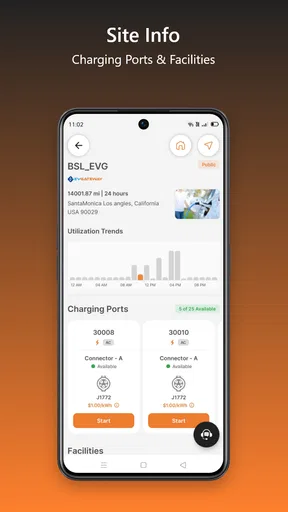
- May provide station details before starting a charging session.
Cons
- Coverage and station availability may vary by region.
- Some chargers may show outdated status information.
- Pricing can differ between networks and may be unclear.
- Requires account setup and compatible payment information.
- App usefulness depends heavily on participating charging providers.
FAQs for EvGateway
What is EvGateway and what can I use it for?
EvGateway is designed to help electric vehicle drivers manage charging-related activities through a single mobile experience. Depending on the connected charging network and available services, users may be able to locate compatible stations, review station details, begin or monitor charging sessions, and check payment or usage information. Features can vary by region, vehicle, charger, and network integration, so it is worth confirming local availability before downloading.
Is EvGateway compatible with my electric vehicle and charging station?
Compatibility does not depend only on the vehicle itself; it may also depend on the charging station operator, connector type, account settings, and the country where the service is being used. Before relying on EvGateway, check whether your preferred charging locations are supported and whether your vehicle uses a compatible connector. Some stations may require a separate RFID card, app, membership, or payment method.
Does EvGateway require an account or payment information?
Many charging services require users to create an account before they can start a session, save payment details, or access charging history. EvGateway may request personal information such as an email address, phone number, or billing details depending on the features enabled by the operator. Review the registration screen and privacy policy carefully, and check pricing, service fees, authorization holds, and cancellation rules before charging.
Can I use EvGateway to find and monitor charging sessions?
The app may provide tools for discovering charging points and viewing information such as location, connector availability, operating status, power level, and pricing. Where supported, it can also show session progress, elapsed time, energy usage, or estimated costs. However, station data can occasionally be delayed or inaccurate, so always verify the charger’s physical condition and follow the instructions displayed at the location.
What should I do if EvGateway does not start a charge or the app stops working?
If a charging session will not begin, first check your internet connection, account status, payment method, vehicle connection, and the charger’s instructions. Restarting the app or signing out and back in may resolve temporary problems. If the issue continues, use the station’s support number or the app’s help channel, and record the charger ID, time, error message, and transaction details so customer service can investigate efficiently.


